



本文链接: https://blog.csdn.net/lishuangquan1987/article/details/129211923
cobra开源地址
https://github.com/spf13/cobra
cobra是什么
Cobra is a library for creating powerful modern CLI applications.
Cobra is used in many Go projects such as Kubernetes, Hugo, and GitHub CLI to name a few. This list contains a more extensive list of projects using Cobra.
cobra是用来创建先进现代化命令行工具的库。 k8s/ Hugo/ Github Cli/ Frp 都是用cobra创建的。
cobra-cli
cobra-cli可以生成对应命令的代码,遵循cobra要求的代码风格和模式。如下的代码示例就是使用cobra-cli来进行的
基本概念
- Command:命令。通过命令告知程序应该做什么。
示例:
docker ps
docker images
docker build -t tony/mes:v1 .
docker run -d -p 10000:1000 tony/mes:v1
ps/ images/ build/ run 均为命令
- Flag:参数值,字段值。有时候,想让程序干一件事情,光命令是不够的,还需要指定一些参数。这些参数叫做Flag。Flag属于某个命令或者根命令。
Flag是对命令的补充,不同的命令下可以有相同的Flag
示例:
docker build -t tony/mes:v1
docker run -d -p 10000:10000
docker run -d --port 10000:10000
docker -h
docker --help
hugo server --port=1313
flag通常是 - 或者 -- 开头,有的有值,有的没有值,是对Command的补充。
上手代码
比如我想写一个API程序,名字叫 cobratest,使用命令指定如下功能
-
启动配置(
serve)- 监听的ip(例如:
--ip=127.0.0.1) - 监听port(例如:
--port=2000或者-p=2000)
- 监听的ip(例如:
-
日志配置(
log)- 日志路径(例如:
--directory=c:/log或者-d=c:/log) - 日志级别(例如:
-level=trace或者-l=trace)
- 日志路径(例如:
-
数据库配置(
db)-
数据库的类型(例如:
--type=mysql或者-t=mysql) -
连接字符串(例如:
--string=xxx或者-s=xxx)程序启动起来大概是这样的命令
-
cobratest serve --ip=0.0.0.0 --port 10000
cobratest log --directory=d:/log --level=info
cobratest db --type=mysql --string=xxx
或者
cobratest serve --ip=0.0.0.0 -p 10000
cobratest log -d=d:/log -l=info
corbratest db -t=mysql -s=xxx
上述有三个cobra中的命令:
- serve
- log
- db
开始撸码
新建一个cobratest文件夹,新建一个main.go文件
初始化go module:
go mod init cobratest
安装cobra-cli
go install github.com/spf13/cobra-cli@latest
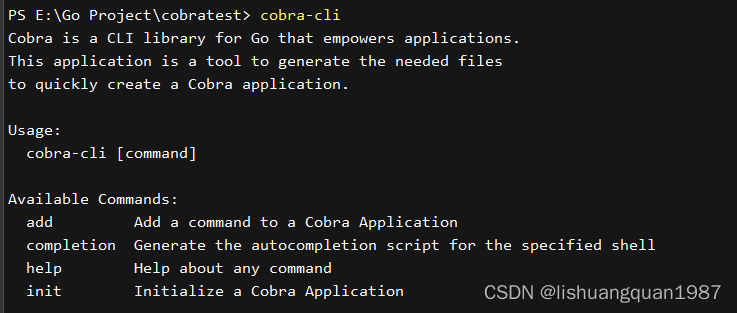
确认安装是否,可以输入 cobra-cli 验证:
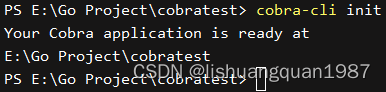
使用cobra-cli初始化go程序
cobra-cli init
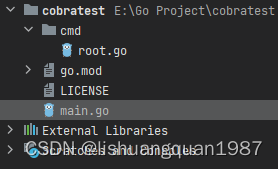
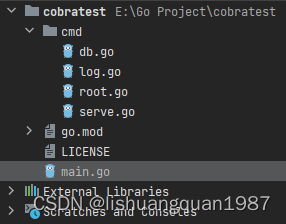
初始化之后,可以看到自动创建了cmd文件夹,并增加了一些代码:
使用cobra-cli创建命令
如上,需要创建 serve/ log/ db 三个Command
cobra-cli add serve
cobra-cli add log
cobra-cli add db
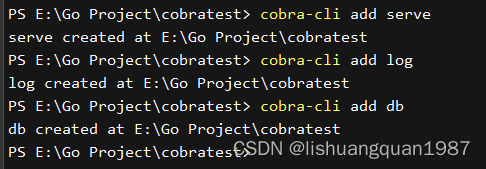
此时可以看到cmd文件夹增加了三个文件: serve.go/ log.go/ db.go
定义接收参数的结构体
新建一个config文件夹,在config文件夹下新建一个 config.go 文件。文件内容如下:
package config

var Config AppConfig

type AppConfig struct {
	ServeConfig    ServeConfig
	LogConfig      LogConfig
	DataBaseConfig DataBaseConfig
}
type ServeConfig struct {
	IP   string
	Port int
}
type LogConfig struct {
	Path  string
	Level string
}
type DataBaseConfig struct {
	Type           string
	ConnnectionStr string
}
在各命令中接收Flag的值
rootCmd/ logCmd/ dbCmd/ serveCmd 都是 cobra.Command 类型,这个类型有许多方法。举例说明其中几个最重要的方法:
Bool: func (f *FlagSet) Bool(name string, value bool, usage string) *bool
BoolVar: func (f *FlagSet) BoolVar(p *bool, name string, value bool, usage string)
BoolP: func (f *FlagSet) BoolP(name, shorthand string, value bool, usage string) *bool
BoolVarP: func BoolVarP(p *bool, name, shorthand string, value bool, usage string)
其中:
- 返回
*bool的为Bool和BoolP方法,使用返回值接收Flag的值 BoolVar和BoolVarP传入Bool指针赋值到变量,区别是是否支持短名称(-)
开始写代码:
root.go:
/*
Copyright © 2023 NAME HERE <EMAIL ADDRESS>
*/
package cmd

import (
	"os"

	"github.com/spf13/cobra"
)

// rootCmd represents the base command when called without any subcommands
var rootCmd = &cobra.Command{
	Use:   "cobratest",
	Short: "a test for cobra",
	Long:  `a test for cobra`,
	// Uncomment the following line if your bare application
	// has an action associated with it:
	// Run: func(cmd *cobra.Command, args []string) { },
}

// Execute adds all child commands to the root command and sets flags appropriately.
// This is called by main.main(). It only needs to happen once to the rootCmd.
func Execute() {
	err := rootCmd.Execute()
	if err != nil {
		os.Exit(1)
	}
}
serve.go:
/*
Copyright © 2023 NAME HERE <EMAIL ADDRESS>
*/
package cmd

import (
	"cobratest/config"
	"fmt"

	"github.com/spf13/cobra"
)

// serveCmd represents the serve command
var serveCmd = &cobra.Command{
	Use:   "serve",
	Short: "define the which ip and port to bind",
	Long:  `define the which ip and port to bind.`,
	Run: func(cmd *cobra.Command, args []string) {
		fmt.Println("serve called")
		fmt.Println(config.Config.ServeConfig)
	},
}

func init() {
	rootCmd.AddCommand(serveCmd)

	//解析 serve --ip=xxx,不使用短名称
	serveCmd.Flags().StringVarP(&config.Config.ServeConfig.IP, "ip", "", "0.0.0.0", "--ip=your_ip")
	//解析 serve --port=xxx或者serve -p=xxx
	serveCmd.Flags().IntVarP(&config.Config.ServeConfig.Port, "port", "p", 10001, "--port=your_port or -p=your_port")
}
log.go:
/*
Copyright © 2023 NAME HERE <EMAIL ADDRESS>
*/
package cmd

import (
	"cobratest/config"
	"fmt"

	"github.com/spf13/cobra"
)

// logCmd represents the log command
var logCmd = &cobra.Command{
	Use:   "log",
	Short: "define the app's log directory and app's log level",
	Long:  `define the app's log directory and app's log level.`,
	Run: func(cmd *cobra.Command, args []string) {
		fmt.Println("log called")
		fmt.Println(config.Config.LogConfig)
	},
}

func init() {
	rootCmd.AddCommand(logCmd)

	// Here you will define your flags and configuration settings.

	// Cobra supports Persistent Flags which will work for this command
	// and all subcommands, e.g.:
	// logCmd.PersistentFlags().String("foo", "", "A help for foo")

	// Cobra supports local flags which will only run when this command
	// is called directly, e.g.:
	logCmd.Flags().StringVarP(&config.Config.LogConfig.Path,"directory", "d", "C:/log", "--directory=your_path or -d=your_path")
	logCmd.Flags().StringVarP(&config.Config.LogConfig.Level,"level","l","trace","-l=your_log_level or --level=your_log_level")
}
db.go:
/*
Copyright © 2023 NAME HERE <EMAIL ADDRESS>
*/
package cmd

import (
	"cobratest/config"
	"fmt"

	"github.com/spf13/cobra"
)

// dbCmd represents the db command
var dbCmd = &cobra.Command{
	Use:   "db",
	Short: "define the db configurations",
	Long:  `define the db configurations.`,
	Run: func(cmd *cobra.Command, args []string) {
		fmt.Println("db called")
		fmt.Println(config.Config.DataBaseConfig)
	},
}

func init() {
	rootCmd.AddCommand(dbCmd)

	// Here you will define your flags and configuration settings.

	// Cobra supports Persistent Flags which will work for this command
	// and all subcommands, e.g.:
	// dbCmd.PersistentFlags().String("foo", "", "A help for foo")

	// Cobra supports local flags which will only run when this command
	// is called directly, e.g.:
	dbCmd.Flags().StringVarP(&config.Config.DataBaseConfig.ConnnectionStr, "string", "s", "", "--string=your_connection_string or -s=your_connection_string")
	dbCmd.Flags().StringVarP(&config.Config.DataBaseConfig.Type, "type", "t", "mysql", "--type=your_type or -t=your_type")
}
运行测试
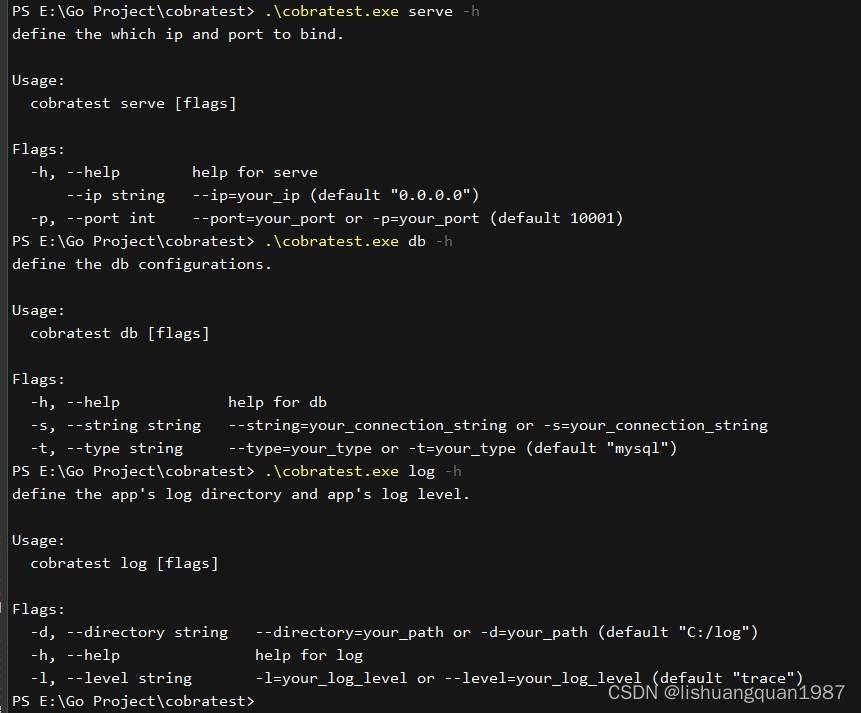
使用cobra创建的命令行工具,自带 help 命令和 -h/ --help Flag
.\cobratest.exe -h
.\cobratest.exe -h
a test for cobra

Usage:
  cobratest [command]

Available Commands:
  completion  Generate the autocompletion script for the specified shell
  db          define the db configurations
  help        Help about any command
  log         define the app's log directory and app's log level
  serve       define the which ip and port to bind

Flags:
  -h, --help   help for cobratest

Use "cobratest [command] --help" for more information about a command.
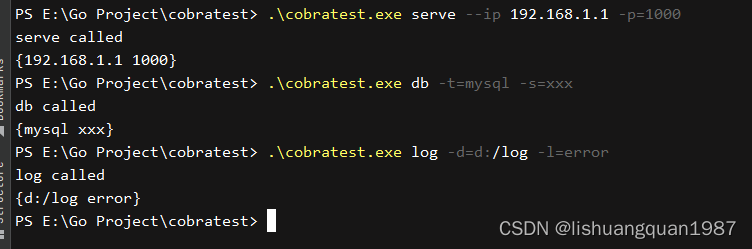
serve命令:
.\cobratest.exe serve --ip 192.168.1.1 -p=1000
serve called
{192.168.1.1 1000}
db命令
.\cobratest.exe db -t=mysql -s=xxx
db called
{mysql xxx}
log命令
 .\cobratest.exe log -d=d:/log -l=error
log called
{d:/log error}
help命令和-h Flag:

评论区