



本文链接: https://blog.csdn.net/lishuangquan1987/article/details/104692648
关于ICollectionView/CollectionView/BindingListCollectionView/ItemCollection/ListCollectionView的介绍:
https://www.cnblogs.com/tianciliangen/p/7010103.html
它们之间的关系是:
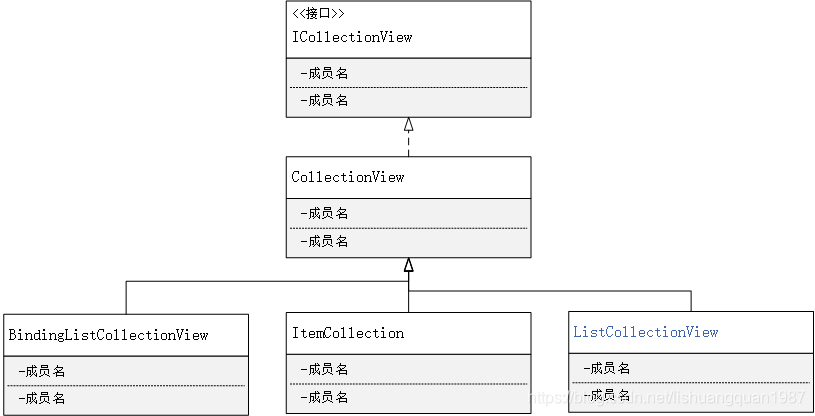
之前我写WPF实现过滤功能是从DataSource进行过滤,实现界面变化,这样效率比较低。搞清楚了下面的关系,就好些代码了:

现在讲讲从ListCollecitonView视图进行过滤的使用:
MainWindowViewModel.cs
public class MainWindowViewModel : INotifyPropertyChanged
    {
        public event PropertyChangedEventHandler PropertyChanged;

        private List<Student> students = new List<Student>();
        public List<Student> Students
        {
            get { return students; }
            set { students = value; }
        }

        private string nameFilterStr;

        public string NameFilterStr
        {
            get { return nameFilterStr; }
            set
            {
                nameFilterStr = value;
                this.PropertyChanged?.Invoke(this, new PropertyChangedEventArgs("NameFilterStr"));
                StudentListView.Refresh();
            }
        }

        private string desFilterStr;

        public string DesFilterStr
        {
            get { return desFilterStr; }
            set
            {
                desFilterStr = value;
                this.PropertyChanged?.Invoke(this, new PropertyChangedEventArgs("DesFilterStr"));

                StudentListView.Refresh();
            }
        }

        public ListCollectionView StudentListView { get; set; }
        public MainWindowViewModel()
        {
            StudentListView = new ListCollectionView(Students);
            for (int i = 0; i < 100000; i++)
            {
                Students.Add(new Student() { Name = "张三"+i, Age = 1, Description = "fsfdsafds" });
                Students.Add(new Student() { Name = "李四"+i, Age = 2, Description = "及王鹏飞" });
                Students.Add(new Student() { Name = "王五"+i, Age = 3, Description = "都没法鲁大师南方男" });
                Students.Add(new Student() { Name = "刘6"+i, Age = 4, Description = "副书记丁阿基佛尔" });
                Students.Add(new Student() { Name = "鲁7"+i, Age = 5, Description = "飞达拉斯科技佛电视剧" });
            }

            StudentListView.Filter = Filter;
        }
        private bool Filter(object obj)
        {
            Student s = obj as Student;
            if (s == null) return false;

            if (string.IsNullOrEmpty(NameFilterStr) && string.IsNullOrEmpty(DesFilterStr))
            {
                return true;
            }
            else if (!string.IsNullOrEmpty(NameFilterStr) && string.IsNullOrEmpty(DesFilterStr))
            {
                if (s.Name.Contains(NameFilterStr))
                {
                    return true;
                }
                return false;
            }
            else if (string.IsNullOrEmpty(NameFilterStr) && !string.IsNullOrEmpty(DesFilterStr))
            {
                if (s.Description.Contains(DesFilterStr))
                {
                    return true;
                }
                return false;
            }
            else
            {
                if (s.Name.Contains(NameFilterStr)&&s.Description.Contains(DesFilterStr))
                {
                    return true;
                }
                return false;
            }
        }
    }
MainWindow.xaml
<Window x:Class="ListCollectionView实现过滤功能.MainWindow"
        xmlns="http://schemas.microsoft.com/winfx/2006/xaml/presentation"
        xmlns:x="http://schemas.microsoft.com/winfx/2006/xaml"
        xmlns:d="http://schemas.microsoft.com/expression/blend/2008"
        xmlns:mc="http://schemas.openxmlformats.org/markup-compatibility/2006"
        xmlns:local="clr-namespace:ListCollectionView实现过滤功能"
        xmlns:vm="clr-namespace:ListCollectionView实现过滤功能.ViewModel"
        mc:Ignorable="d"
        Title="MainWindow" Height="450" Width="800">
    <Window.DataContext>
        <vm:MainWindowViewModel></vm:MainWindowViewModel>
    </Window.DataContext>
    <Grid>
        <Grid.RowDefinitions>
            <RowDefinition Height="30"></RowDefinition>
            <RowDefinition></RowDefinition>
        </Grid.RowDefinitions>
        <StackPanel Orientation="Horizontal" Margin="2">
            <Label>名称过滤:</Label>
            <TextBox Width="100" Text="{Binding NameFilterStr,Mode=TwoWay, UpdateSourceTrigger=LostFocus}"></TextBox>
            <Label>描述过滤:</Label>
            <TextBox Width="100" Text="{Binding DesFilterStr,Mode=TwoWay, UpdateSourceTrigger=PropertyChanged}"></TextBox>
        </StackPanel>
        <DataGrid ItemsSource="{Binding StudentListView}" Grid.Row="1"></DataGrid>
    </Grid>
</Window>
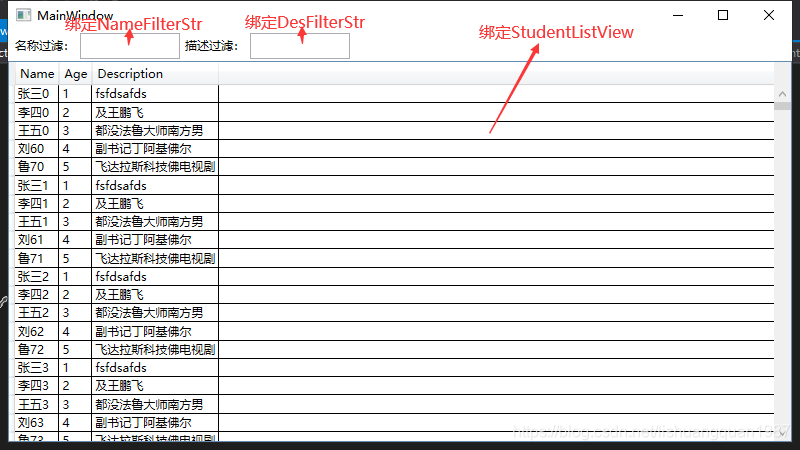

ListCollectionView过滤,就是调用Filter,然后告诉视图,每个元素是否显示就可以了,最后别忘记StudentListView.Refresh();
另外一种方式
使用 CollectionViewSource
stepModeSourceview =CollectionViewSource.GetDefaultView(StepModeSource);
stepModeSourceview.Filter = FileterStepModeSource;
评论区