



本文链接: https://blog.csdn.net/lishuangquan1987/article/details/125020580
版权
在做WPF开发的时候,经常遇到如下错误: 不具有由 URI“xxx”识别的资源 或者 The component ‘XXX’ does not have a resource identified by the URI
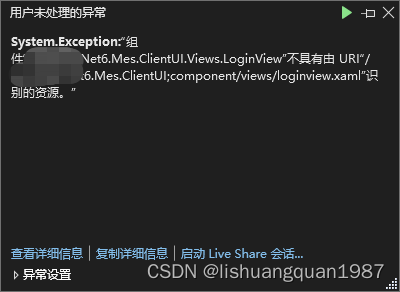
根本原因暂未找到。但是可以通过如下办法解决:
有哪位大神找打根本原因,欢迎留言给我,不胜感激
新建一个View的拓展方法:
public static class Extension
{
    /// <summary>
    /// wpf 出现 组件“xxx”不具有由 URI“xxx”识别的资源。错误时的解决办法
    /// </summary>
    /// <param name="userControl"></param>
    /// <param name="baseUri"></param>
    public static void LoadViewFromUri(this FrameworkElement userControl, string baseUri)
    {
        try
        {
            var resourceLocater = new Uri(baseUri, UriKind.Relative);
            var exprCa = (PackagePart)typeof(System.Windows.Application).GetMethod("GetResourceOrContentPart", BindingFlags.NonPublic | BindingFlags.Static).Invoke(null, new object[] { resourceLocater });
            var stream = exprCa.GetStream();
            var uri = new Uri((Uri)typeof(BaseUriHelper).GetProperty("PackAppBaseUri", BindingFlags.Static | BindingFlags.NonPublic).GetValue(null, null), resourceLocater);
            var parserContext = new ParserContext
            {
                BaseUri = uri
            };
            typeof(XamlReader).GetMethod("LoadBaml", BindingFlags.NonPublic | BindingFlags.Static).Invoke(null, new object[] { stream, parserContext, userControl, true });
        }
        catch (Exception)
        {
            //log
        }
    }
}
在View的构造函数中注释掉 InitializeComponent 方法,使用拓展方法:
public LoginView(IContainerProvider container)
{
 	 //InitializeComponent(); //注释掉
     this.LoadViewFromUri("/Test.ClientUI;component/Views/LoginView.xaml");
     this.DataContext = container.Resolve<LoginViewModel>((typeof(LoginView),this));
}
评论区